Integrations for Hosted Web Apps
Filter by integration attributes

Tradly AI Search
Tradly AI Search uses advanced semantic understanding to interpret user intent — not just exact words. Customers can find relevant products even when their queries are vague, incomplete, or phrased differently. Instead of forcing users to guess the right keywords, your platform adapts to how people naturally search.
Why It Matters
Benefit | Description |
|---|---|
🚀 Higher Conversion Rates | Users find relevant products faster, increasing purchase likelihood |
🔍 Reduced Search Friction | No more "no results found" dead ends |
💡 Improved User Experience | Natural, human-like search behaviour |
📦 Better Product Visibility | Surface relevant listings beyond exact keyword matches |
Integration Guide
Setting up Tradly AI Search is fully automated — no manual data entry or configuration required.
Step 1 — Access the Dashboard
Go to the Integrations section inside your Tradly AI Search portal:
👉 https://aistudio.tradly.app/search/integrations
Step 2 — Select Tradly
Find the Tradly integration card and open its connection settings.
Step 3 — Sync Your Catalog
Click "Setup Integration" to begin syncing your marketplace listings. All existing products will be automatically indexed — no manual uploads needed.
Step 4 — Go Live
Once syncing is complete, enable the "AI Search" toggle to activate semantic search across your storefront.
What Changes After Activation?
Search results become intent-driven, not keyword-dependent
Users discover more relevant products with fewer queries
Your marketplace delivers a modern, AI-powered shopping experience
Activating the AI Search Block
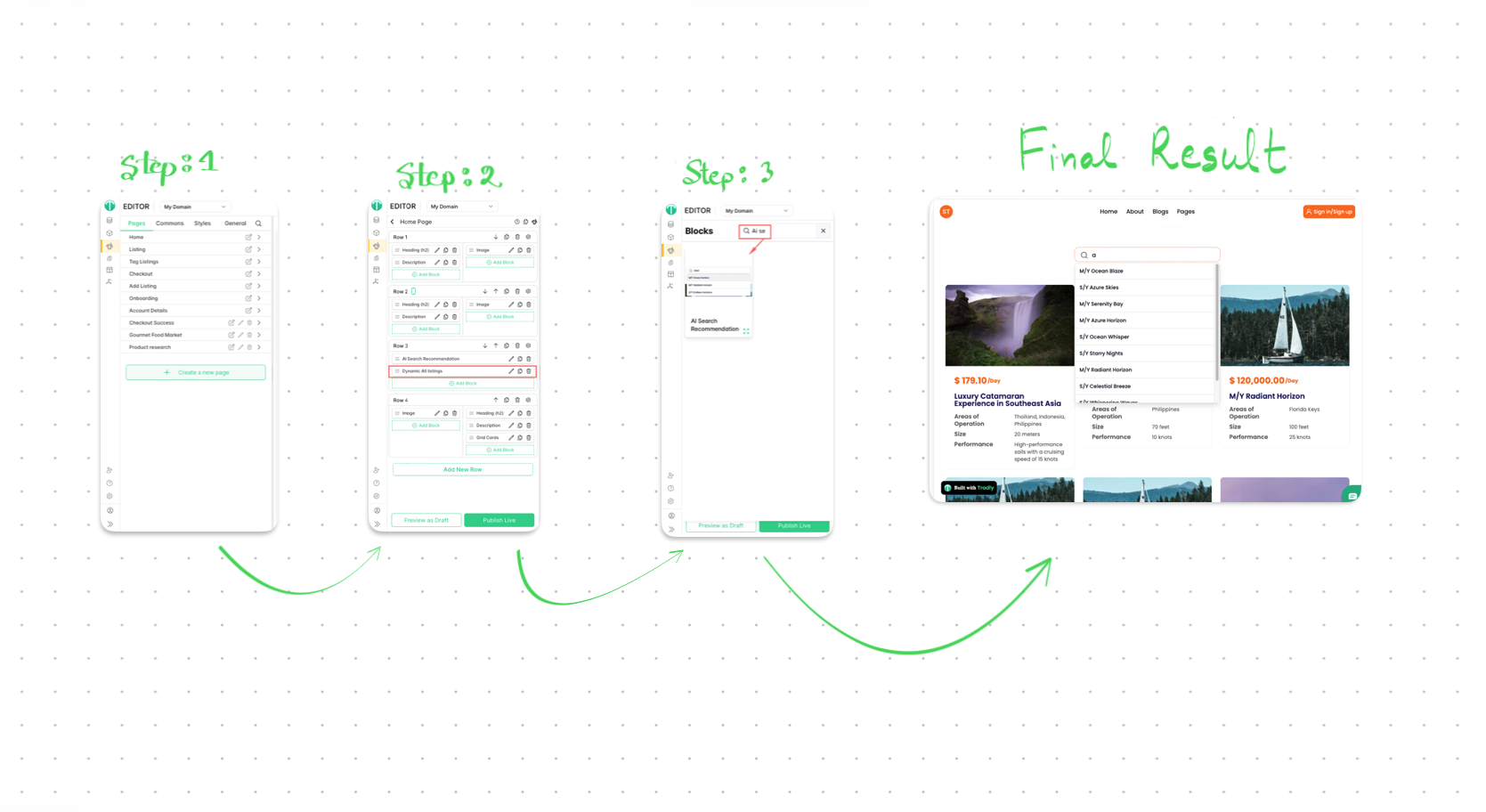
After completing the setup above, you need to add the AI Search Recommendation block to your storefront to make the search with suggestions visible to your users.
How to Add the Block
Open your page editor (this can be any page — header, footer, homepage, or any custom page).
In the blocks search bar, type "AI Search Recommendation".
Select the block from the results and add it to your desired location.
💡 Tip: You can place the AI Search Recommendation block anywhere — in the header, footer, a landing page section, or any other part of your storefront. It's fully flexible.
Once the block is added, the AI-powered search bar with suggestions will be immediately visible to your users.
Summary
1. Connect via Dashboard → Integrations
2. Select Tradly → Setup Integration
3. Wait for catalog sync to complete
4. Enable the AI Search toggle
5. Add the "AI Search Recommendation" block in your editor
6. Your AI-powered search is live ✅
Shopping Agent
Enhance Your Marketplace with Tradly AI Shopping Agent
Upgrade your marketplace search from basic keyword matching to intelligent discovery.
Tradly AI Shopping Agent uses advanced semantic understanding to interpret user intent—not just exact words. This means customers can find relevant products even when their queries are vague, incomplete, or phrased differently.
Instead of forcing users to guess the right keywords, your platform adapts to how people naturally search.
Why It Matters
Higher Conversion Rates — Users find relevant products faster, increasing purchase likelihood
Reduced Search Friction — No more “no results found” dead ends
Improved User Experience — Natural, human-like search behavior
Better Product Visibility — Surface relevant listings beyond exact keyword matches
Integration Guide
Setting up Tradly AI Search is fully automated—no manual data entry or configuration required.
1. Access the Dashboard
Go to the Integrations section inside your Tradly AI Search portal https://aistudio.tradly.app/search/integrations.
2. Select Tradly
Find the Tradly integration and open the connection settings.
3. Sync Your Catalog
Click “Setup Integration” to begin syncing your marketplace listings.
All existing products will be automatically indexed.
4. Go Live
Once syncing is complete, enable the “AI Search” toggle to activate semantic search across your storefront.
What Changes After Activation?
Search results become intent-driven, not keyword-dependent
Users discover more relevant products with fewer queries
Your marketplace delivers a modern, AI-powered shopping experience
Want more Integrations?
Post your ideas and request in our community forum.